
Inertial Labs INS (All sensors, including INS-U/INS-DU)
Inertial Labs designs and develops IMU, AHRS, GNSS/INS and other solutions. A universal protocol is used for all Inertial Labs sensors.
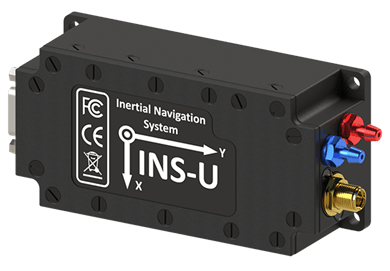
Benefits to PX4 users:
- Higher accuracy heading, pitch, and roll estimates
- More robust and reliable GNSS positioning
- Improved positioning and attitude performance in GNSS-contested environments
- Performance under challenging dynamic conditions (e.g. catapult launches, VTOL operations, high-g or high angular rate operations)
- Work in different spoofing and jamming conditions
PX4 can use these in a mode that provides only raw sensor output (the default), or as an external INS that provides both sensor output and INS data such as position and velocity estimates. The mode is configurable using a parameter.
Where to Buy
Get technical support or send requests to sales team. Recommended sensors:
- INS-U GNSS/INS: Recommended for fixed-wing systems without hovering, where static heading is not necessary.
- INS-DU DUAL GNSS/INS: Recommended for multicopter systems where hovering and low dynamics requires the use of static heading.
Hardware Setup
Wiring
Connect the sensor to any unused flight controller serial interface, such as a spare GPS or TELEM.
Mounting
The Inertial Labs sensors can be mounted in any orientation. You can set offsets for coordinate axes in the sensor-configuration software that is provided with your sensor.
Firmware Configuration
PX4 Configuration
To use the Inertial Labs driver:
Build the firmware with the ilabs module.
Make sure the UART RX-buffer for the serial port connected to the INS is at least 600 bytes.
TIP
For example, when using
TELEM2on Pixhawk 6X, add the following setting to defconfig:CONFIG_UART5_RXBUFSIZE=600Note that the mapping between UART number and port name can usually be found in your board's Serial Port Mapping section.
Include the module in firmware in the kconfig board configuration by setting the kconfig variables:
CONFIG_DRIVERS_INS_ILABS. In the kconfig interface: Drivers -> INS -> ilabs.
Set the parameter SENS_ILABS_CFG to the hardware port connected to the sensor, such as a spare
GPSorTELEM.WARNING
Disable or change port of other sensors that are using the same one, for example GPS_1_CONFIG if using GPS1 port.
Allow the Inerital Labs driver to initialize by restarting PX4.
Configure driver to provide IMU data or Raw sensors data :
For external INS, set ILABS_MODE to
INS.In this case, the EKF2_EN, SENS_IMU_MODE, and SENS_MAG_MODE parameters are disabled at startup (set to
0). Аnd the INS's internal EKF is used for orientation.For raw inertial sensors, set ILABS_MODE to
Sensors Only.Prioritize Inertial Labs sensors using CAL_GYROn_PRIO, CAL_ACCn_PRIO, CAL_BAROn_PRIO, CAL_MAGn_PRIO, where
nis the instance number of the IMU component (0, 1, etc.).TIP
In most cases the external IMU is the highest-numbered. You can get a list of the IMU components available using
uorb top -1, you can differentiate between them using thelistenercommand and looking through the data, or just the rates.Alternatively, you can check CAL_GYROn_ID to see the device id. The priority is 0-255, where 0 is entirely disabled and 255 is highest priority.
WARNING
When configuring both Inertial Labs and Pixhawk sensors to have non-zero priority, if the selected sensor is errored (timeout), it can change during operation without being notified. In this case, MAVLink messages will be updated with the newly selected sensor.
If you don't want to have this fallback mechanism, you must disable unwanted sensors.
Restart PX4.
Once enabled, the module will be detected on boot.
Inertial Labs Sensor Configuration
Perform sensor configuration according to the Interface Control Document (ICD) that comes with each device. The sensor-configuration software allows you to set the baurate and the data format, and you can also adjust the orientation axes if the sensor wasn't oriented in the normal way. This process is usually short and takes a few minutes, depending on the sensor and the installation conditions on the vehicle.
Published Data
These uORB topics are published:
If enabled as an external INS, publishes:
If enabled as external sensor only:
external_ins_local_positionexternal_ins_global_positionexternal_ins_attitude
TIP
Published topics can be viewed using the listener command.