
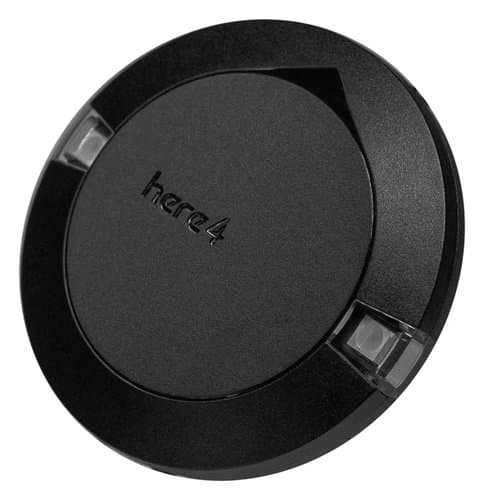
CubePilot Here4 RTK GNSS (DroneCAN)
The CubePilot Here4 is a dual-band (L1/L5) RTK GNSS module that connects to the flight controller via DroneCAN. It integrates a u-blox NEO-F9P receiver, an RM3100 compass, a barometer, an IMU and RGB LEDs.
WARNING
CubePilot has issued safety service bulletins for the Here4, including a mandatory bootloader update before further flight (SB_0000010). Check the bulletins before flying (see Receiver Configuration for the firmware and bootloader update).
Variants
- Here4 Base: RTK base station with an external antenna connector, for use with QGroundControl.
- Here4 Blue: Here4 with integrated Bluetooth Remote ID (CubeID).
Specifications
From the CubePilot Here4 manual:
- Receiver: u-blox NEO-F9P
- Constellations: GPS, GLONASS, Galileo, BeiDou, QZSS, SBAS
- Bands: L1/L5
- Update rate: Up to 20Hz (RTK)
- Position accuracy: 0.01m + 1ppm CEP (RTK)
- Compass: RM3100
- Barometer: MS5611
- IMU: ICM42688
- Processor: STM32H757, running CubePilot's AP_Periph-based firmware
- Interface: DroneCAN, two CAN ports (only one supported by the current firmware; see Wiring)
- Input voltage: 5V (CAN connector)
- Connector: JST-GH 4-pin
- Operating temperature: -40°C to +85°C
- Dimensions: 16 x 68mm
- Weight: 60g (with cable)
Where to Buy
Hardware Setup
Mounting
Mount the module as far away from other electronics as possible, with its direction marker pointing towards the front of the vehicle. For more information, see Mounting a Compass.
Pinouts
CAN connector, from the Here4 manual:
| Pin | Signal |
|---|---|
| 1 | 5V |
| 2 | CAN_H |
| 3 | CAN_L |
| 4 | GND |
Wiring
Connect the Here4 to the CAN1 or CAN2 port of the flight controller using the supplied 4-pin CAN cable. The Here4 is powered from the CAN port. If the Here4 is the last node on the bus, enable its termination resistor (see PX4 Configuration). For more information, refer to the CAN Wiring instructions.
WARNING
The Here4 has two CAN ports, but the current firmware only supports one of them: the port whose cable has green, blue, white and grey wires. If the other port is used, the Here4 does not appear on the bus (see Testing).
PX4 Configuration
Set the PX4 parameters:
- UAVCAN_ENABLE to
2(Sensors Automatic Config), or3if you also use DroneCAN ESCs. - UAVCAN_PUB_RTCM to
1for RTK, so that PX4 forwards RTCM corrections to the Here4. See DroneCAN > RTK GPS and RTK GNSS for the base station setup. - UAVCAN_SUB_BARO to
1to also use the Here4 barometer.
- UAVCAN_ENABLE to
Power cycle the vehicle.
The Here4 is then assigned a node ID via dynamic node allocation, and its GNSS and compass are used without further configuration.
Set the parameters on the Here4 itself, if needed:
CAN_TERMINATORto1if the Here4 is the last node on the CAN bus, to enable its termination resistor (off by default).BARO_ENABLEto1to use the barometer (disabled by default).
Set and save them either in the QGroundControl parameters of the Here4 component, or from the MAVLink Shell (the node ID is shown by
uavcan status):shuavcan param set <node-id> CAN_TERMINATOR 1 uavcan param set <node-id> BARO_ENABLE 1 uavcan param save <node-id>Then power cycle the vehicle again.
If the Here4 is not positioned at the vehicle centre of gravity, set its offset using SENS_GNSS0_OFFX, SENS_GNSS0_OFFY and SENS_GNSS0_OFFZ.
DroneCAN configuration in PX4 is explained in more detail in DroneCAN > PX4 Configuration.
Testing
Run uavcan status in the MAVLink Shell. The Here4 should be listed under Online nodes with mode OPERAT, and the gnss, mag and (if enabled) baro sensors should each show a channel bound to the Here4 node ID. If the Here4 is connected by its unsupported CAN port, it is not listed, and the status shows TX frames and an equally growing number of HW errors, with no RX frames.
To check RTK, run listener sensor_gnss: fix_type is 5 for an RTK float solution and 6 for RTK fixed.
Receiver Configuration
CubePilot publishes the Here4 firmware and release notes at GNSSPeriph-release.
PX4 can update the Here4 from the SD card, as described in DroneCAN > Firmware Update:
- Copy
Here4_FW.binfrom the release archive to the root of the SD card. - Reboot with the Here4 connected. PX4 moves the file to
/fs/microsd/ufw/1043.bin(1043 is the Here4 board ID) and updates the Here4 if its firmware differs. During the updateuavcan statusshows the Here4 with modeSW_UPD, and thenOPERATagain once it has completed.
You can check the installed version with listener device_information, in the message whose name is com.cubepilot.here4: firmware_version shows the major and minor version followed by the git hash of the build in decimal (DroneCAN does not report the patch version).
If the Here4 stays in SW_UPD without completing, remove the file from /fs/microsd/ufw/ and update the Here4 with CubePilot's tools instead (see the bulletin below).
According to SB_0000010, a Here4 with the updated bootloader breathes blue at boot. If yours does not, follow the bulletin: update the firmware, then set the Here4 parameter FLASH_BOOTLOADER to 1 to update the bootloader.
Further Information
- CubePilot Here4 Manual (docs.cubepilot.org)