
jMAVSim з SITL
WARNING
This simulator is community supported and maintained. It may or may not work with current versions of PX4 and may be removed in future releases.
Дивіться Встановлення інструментарію для інформації про середовища та інструменти, що підтримуються основною командою розробників.
jMAVSim is a simple multirotor/Quad simulator that allows you to fly copter type vehicles running PX4 around a simulated world. Його легко налаштувати і можна використовувати для перевірки того, що ваш апарат може злітати, летіти, приземлятися і належним чином реагувати на різні несправності (наприклад, несправність GPS).
Supported Vehicles:
- Quad
Ця тема показує, як налаштувати jMAVSim для підключення до SITL версії PX4.
TIP
jMAVSim can also be used for HITL Simulation (as shown here).
Встановлення
jMAVSim requires JDK 17 or later. On Ubuntu and Windows, the standard development environment setup scripts install all required dependencies including Java. On macOS, you need to install Java manually as shown below.
macOS
jMAVSim requires OpenJDK 17 or later. Install it via Homebrew:
brew install openjdk@17Homebrew installs OpenJDK but does not link it into your PATH, so you need to set JAVA_HOME for jMAVSim to find it. Add this to your shell profile (e.g. ~/.zshrc):
export JAVA_HOME=$(/usr/libexec/java_home -v 17)Середовище симуляції
Симуляція програмного забезпечення в петлі виконує повну систему на комп'ютері та моделює автопілот. Він підключається через локальну мережу до симулятора. Вигляд налаштування виглядає наступним чином:

Запуск SITL
After ensuring that the simulation prerequisites are installed on the system, just launch: The convenience make target will compile the POSIX host build and run the simulation.
make px4_sitl_default jmavsimЦе запустить консоль PX4 як показано нижче:
[init] shell id: 140735313310464
[init] task name: px4

______  __   __    ___
| ___ \ \ \ / /   /   |
| |_/ /  \ V /   / /| |
|  __/   /   \  / /_| |
| |     / /^\ \ \___  |
\_|     \/   \/     |_/

Ready to fly.


pxh>
It will also bring up a window showing a 3D view of the jMAVSim simulator:
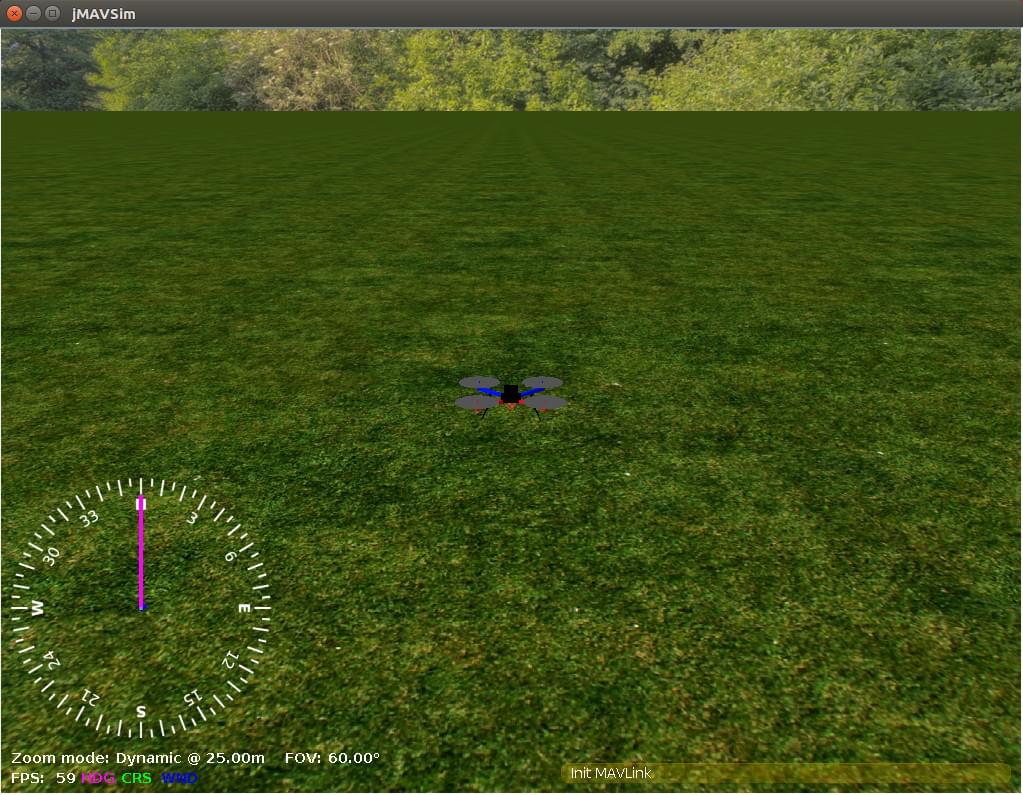
Підйом у небо
Система почне друкувати інформацію про статус. You will be able to start flying once you have a position lock (shortly after the console displays the message: EKF commencing GPS fusion).
Щоб злітіти, введіть наступне у консоль:
pxh> commander takeoffYou can use QGroundControl to fly a mission or to connect to a joystick.
Використання/Налаштування
Options that apply to all simulators are covered in the top level Simulation topic (some of these may be duplicated below).
Імітація відмови датчика/обладнання
Simulate Failsafes explains how to trigger safety failsafes like GPS failure and battery drain.
Встановлення власного місця зльоту
The default takeoff location in can be overridden using the environment variables: PX4_HOME_LAT, PX4_HOME_LON, and PX4_HOME_ALT.
Наприклад, щоб встановити широту, довготу та висоту:
export PX4_HOME_LAT=28.452386
export PX4_HOME_LON=-13.867138
export PX4_HOME_ALT=28.5
make px4_sitl_default jmavsim
Зміна швидкості симуляції
The simulation speed can be increased or decreased with respect to realtime using the environment variable PX4_SIM_SPEED_FACTOR.
To run at double real-time:
PX4_SIM_SPEED_FACTOR=2 make px4_sitl_default jmavsimTo run at half real-time:
PX4_SIM_SPEED_FACTOR=0.5 make px4_sitl_default jmavsimTo apply a factor to all SITL runs in the current session, use EXPORT:
export PX4_SIM_SPEED_FACTOR=2
make px4_sitl_default jmavsim
Використання джойстика
Joystick and thumb-joystick support are supported through QGroundControl (setup instructions here).
Моделювання Wifi Дрона
Є спеціальна ціль для моделювання безпілотника, підключеного через Wifi до локальної мережі:
make broadcast jmavsimСимулятор транслює свою адресу в локальній мережі так, як це робив би справжній безпілотник.
Запуск JMAVSim та PX4 окремо
Ви можете запустити JMAVSim та PX4 окремо:
./Tools/simulation/jmavsim/jmavsim_run.sh -l
make px4_sitl none
Це дозволяє швидший цикл тестування (перезапуск jMAVSim займає значно більше часу).
Режим без інтерфейсу
To start jMAVSim without the GUI, set the env variable HEADLESS=1 as shown:
HEADLESS=1 make px4_sitl jmavsimСимуляція кількох рухомих засобів
JMAVSim can be used for multi-vehicle simulation: Multi-Vehicle Sim with JMAVSim.
Lockstep
PX4 SITL and jMAVSim have been set up to run in lockstep. What this means is that PX4 and the simulator run at the same speed, and therefore can react appropriately to sensor and actuator messages. Lockstep makes it possible to change the simulation speed, and also to pause it in order to step through code.
Lockstep Sequence
The sequence of steps for lockstep are:
- The simulation sends a sensor message HIL_SENSOR including a timestamp
time_usecto update the sensor state and time of PX4. - PX4 receives this and does one iteration of state estimation, controls, etc. and eventually sends an actuator message HIL_ACTUATOR_CONTROLS.
- The simulation waits until it receives the actuator/motor message, then simulates the physics and calculates the next sensor message to send to PX4 again.
The system starts with a "freewheeling" period where the simulation sends sensor messages including time and therefore runs PX4 until it has initialized and responds with an actuator message.
Disabling Lockstep
The lockstep simulation can be disabled if, for example, SITL is to be used with a simulator that does not support this feature. In this case the simulator and PX4 use the host system time and do not wait on each other.
To disable lockstep in:
- PX4, run
make px4_sitl_default boardconfigand set theBOARD_NOLOCKSTEP"Force disable lockstep" symbol which is located under toolchain. - jMAVSim, remove
-lin sitl_run.sh, or make sure otherwise that the java binary is started without the-lockstepflag.
Розширення та персоналізація
To extend or customize the simulation interface, edit the files in the Tools/jMAVSim folder. The code can be accessed through thejMAVSim repository on Github.
INFO
The build system enforces the correct submodule to be checked out for all dependencies, including the simulator. Це не перезапише зміни в файлах у каталозі, проте, коли ці зміни будуть зафіксовані, підмодуль повинен бути зареєстрований у репозиторії Firmware з новим хешем коміту. To do so, git add Tools/jMAVSim and commit the change. Це оновить хеш GIT симулятора.
Взаємодія з ROS
The simulation can be interfaced to ROS the same way as onboard a real vehicle.
Важливі файли
- The startup scripts are discussed in System Startup.
- The simulated root file system ("
/" directory) is created inside the build directory here:build/px4_sitl_default/rootfs.
Display-Only Mode
jMAVSim can run as a display-only renderer for other simulators (like SIH), with its internal physics disabled. In this mode, jMAVSim receives vehicle position via MAVLink and only renders the 3D view.
To use jMAVSim as a display for SIH running in SITL:
# Start SIH first
make px4_sitl_sih sihsim_quadx

# In another terminal, start jMAVSim in display-only mode
./Tools/simulation/jmavsim/jmavsim_run.sh -p 19410 -u -q -o  # 19410 is the default SIH display port
For SIH running on flight controller hardware:
./Tools/simulation/jmavsim/jmavsim_run.sh -q -d /dev/ttyACM0 -b 2000000 -oUse -a for airplane display or -t for tailsitter display.
Command-Line Reference
The jmavsim_run.sh launch script accepts the following flags:
| Flag | Опис |
|---|---|
-b <rate> | Serial baud rate (default: 921600) |
-d <device> | Serial device path (e.g., /dev/ttyACM0) |
-u | Use UDP connection instead of serial |
-i <id> | Simulated MAVLink system ID |
-p <port> | UDP port (default: 14560) |
-q | No interactive console |
-s <port> | TCP serial port |
-r <rate> | Render rate in Hz |
-l | Enable lockstep |
-o | Display-only mode (disable physics, render only) |
-a | Use airplane model |
-t | Use tailsitter model |
HEADLESS=1 | Environment variable: run without GUI window |
How jMAVSim Works
jMAVSim is a Java-based lightweight simulator that communicates with PX4 via MAVLink HIL (Hardware-In-the-Loop) messages.
In normal mode:
- PX4 sends actuator commands via HIL_ACTUATOR_CONTROLS.
- jMAVSim runs its physics engine to compute the vehicle state.
- jMAVSim sends sensor data back via HIL_SENSOR and HIL_GPS.
In display-only mode (-o flag), jMAVSim disables its physics engine and only reads HIL_STATE_QUATERNION messages to render the vehicle position. This allows it to visualize vehicles from other simulators like SIH.
jMAVSim supports lockstep synchronization with PX4 (enabled with -l flag), ensuring deterministic simulation results.
Keyboard Shortcuts
Camera modes in the jMAVSim 3D view:
| Key | Camera Mode |
|---|---|
| F | First person (attached to vehicle) |
| S | Stationary (fixed position) |
| G | Gimbal (follows vehicle orientation) |
| (default) | Third person follow |
Усунення проблем
java.long.NoClassDefFoundError
Exception in thread "main" java.lang.NoClassDefFoundError: javax/vecmath/Tuple3d
at java.base/java.lang.Class.forName0(Native Method)
at java.base/java.lang.Class.forName(Class.java:374)
at org.eclipse.jdt.internal.jarinjarloader.JarRsrcLoader.main(JarRsrcLoader.java:56)
Caused by: java.lang.ClassNotFoundException: javax.vecmath.Tuple3d
at java.base/java.net.URLClassLoader.findClass(URLClassLoader.java:466)
at java.base/java.lang.ClassLoader.loadClass(ClassLoader.java:566)
at java.base/java.lang.ClassLoader.loadClass(ClassLoader.java:499)
... 3 more
Exception in thread "main" java.lang.NoClassDefFoundError: javax/vecmath/Tuple3d
at java.base/java.lang.Class.forName0(Native Method)
at java.base/java.lang.Class.forName(Class.java:374)
at org.eclipse.jdt.internal.jarinjarloader.JarRsrcLoader.main(JarRsrcLoader.java:56)
Caused by: java.lang.ClassNotFoundException: javax.vecmath.Tuple3d
at java.base/java.net.URLClassLoader.findClass(URLClassLoader.java:466)
at java.base/java.lang.ClassLoader.loadClass(ClassLoader.java:566)
at java.base/java.lang.ClassLoader.loadClass(ClassLoader.java:499)
This error should no longer occur once the jMAVSim submodule is updated to newer jar libs and Java 11 or Java 14 should work fine.
Відбулася незаконна відображувальна операція доступу
Це попередження можна ігнорувати (ймовірно, воно буде відображено, але симуляція все одно буде працювати правильно).
WARNING: An illegal reflective access operation has occurred
WARNING: Illegal reflective access by javax.media.j3d.JoglPipeline (rsrc:j3dcore.jar) to method sun.awt.AppContext.getAppContext()
WARNING: Please consider reporting this to the maintainers of javax.media.j3d.JoglPipeline
WARNING: Use --illegal-access=warn to enable warnings of further illegal reflective access operations
WARNING: All illegal access operations will be denied in a future release
Inconsistency detected by ld.so: dl-lookup.c: 112: check_match: Assertion version->filename == NULL || ! _dl_name_match_p (version->filename, map)' failed!
java.awt.AWTError: Assistive Technology not found: org.GNOME.Accessibility.AtkWrapper
Виключення в потоці "main" java.lang.reflect.InvocationTargetException
в sun.reflect.NativeMethodAccessorImpl.invoke0 (Нативний метод)
в sun.reflect.NativeMethodAccessorImpl.invoke (NativeMethodAccessorImpl.java:62)
в sun.reflect.DelegatingMethodAccessorImpl.invoke (DelegatingMethodAccessorImpl.java:43)
в java.lang.reflect.Method.invoke (Method.java:498)
в org.eclipse.jdt.internal.jarinjarloader.JarRsrcLoader.main (JarRsrcLoader.java:58)
Викликано: java.awt.AWTError: Не знайдено технологію сприяння: org.GNOME.Accessibility.AtkWrapper
в java.awt.Toolkit.loadAssistiveTechnologies (Toolkit.java:807)
в java.awt.Toolkit.getDefaultToolkit (Toolkit.java:886)
в java.awt.Window.getToolkit (Window.java:1358)
в java.awt.Window.init (Window.java:506)
в java.awt.Window. (Window.java:537)
в java.awt.Frame. (Frame.java:420)
в java.awt.Frame. (Frame.java:385)
в javax.swing.JFrame. (JFrame.java:189)
в me.drton.jmavsim.Visualizer3D. (Visualizer3D.java:104)
в me.drton.jmavsim.Simulator. (Simulator.java:157)
в me.drton.jmavsim.Simulator.main (Simulator.java:678)
Якщо ви бачите цю помилку, спробуйте цей обхідний шлях:
Edit the accessibility.properties file:
sudo gedit /etc/java-8-openjdk/accessibility.propertiesта закоментуйте рядок, вказаний нижче:
#assistive_technologies=org.GNOME.Accessibility.AtkWrapperFor more info, check this GitHub issue. A contributor found the fix in askubuntu.com.
Виняток у потоці "main" java.lang.UnsupportedClassVersionError
При компіляції jMAVsim ви можливо зіткнетеся з наступною помилкою:
Exception in thread "main" java.lang.UnsupportedClassVersionError: me/drton/jmavsim/Simulator has been compiled by a more recent version of the Java Runtime (class file version 59.0), this version of the Java Runtime only recognizes class file versions up to 58.0Ця помилка говорить вам, вам потрібна більш свіжа версія Java у вашому середовищі. Версія файлу класу 58 відповідає jdk14, версія 59 - jdk15, версія 60 - jdk 16 тощо.
To fix it under macOS, install a newer OpenJDK via Homebrew:
brew install openjdk@17